로그인 로직을 구현하기 위해 스프링 시큐리티에 대해 찾아보면서 정리한 글이다.
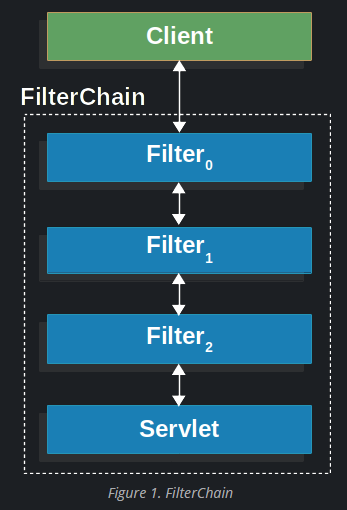
스프링에서 서블릿으로 리퀘스트가 넘어가기 전에 필터를 거치게 할 수 있다.
공부 과정에서 ApplicationFilterChain에서 적용되는 그냥 filter와 SecurityFilterChain에서 적용되는 security filter가 헷갈려서 여기 기록을 남긴다.
1. application filter chain과 security filter chain은 다르다
이 필터 체인을 application filter chain이라 한다.
그리고security filter chain은 따로 있다.
DelegatingFilterProxy는 필터의 일종으로, 미리 지정한 targetBeanName을 기준으로 bean 객체를 찾아 내부에 저장한다. 이때 기본적으로 targetBeanName이 springSecurityFilterchain으로 되어있는데, 이의 클래스가 바로 FilterChainProxy이다.
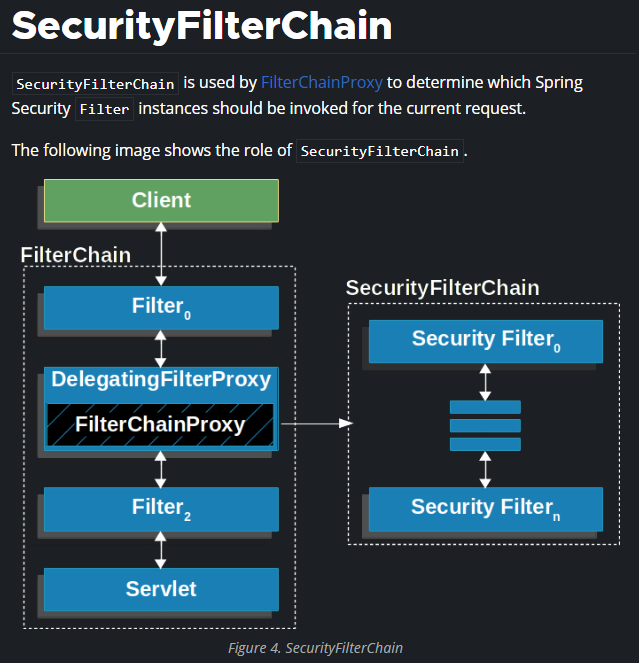
delegate의 뜻이 위임하다는 뜻인데, DelegatingFilterProxy는 실행되면 targetBeanName에 해당하는 bean이 있는지 확인하고, 이를 찾아서 권한을 위임한다. 즉 실제로 각종 시큐리티 필터 bean들을 다루는 일은 FilterChainProxy에서 일어난다.
그러면 왜 FilterChainProxy에서 이 일을 하느냐...는 spring 블로그에 나와있는데 솔직히 초보자 입장에서는 이해가 안가서 링크만 남겨둔다.
(이 부분 외에도 위 그림과 설명은 아래 공식 문서가 출처)
https://docs.spring.io/spring-security/reference/servlet/architecture.html
Architecture :: Spring Security
The Security Filters are inserted into the FilterChainProxy with the SecurityFilterChain API. Those filters can be used for a number of different purposes, like authentication, authorization, exploit protection, and more. The filters are executed in a spec
docs.spring.io
2. Application Filter Chain에 필터 추가하기
아래는 내 코드다. 로그인 횟수를 제한하기 위해 카운트하는 필터를 만들었다.
Filter을 확장하여 좀 더 구체화시킨 클래스가 GenericFilterBean인데, 이를 확장하여 커스텀필터를 만들었다.
public class LoginLimitFilter extends GenericFilterBean {
    private final int MAX_ATTEMPTS=5;
    private final Map<String, Integer> attempts=new HashMap<>();

    @Override
    public void doFilter(ServletRequest request, ServletResponse response, FilterChain chain) throws IOException, ServletException {
        HttpServletRequest req = (HttpServletRequest) request;
        String username = req.getParameter("username");

        if (username != null) {
            //Integer은 wrapper 클래스.
            Integer loginAttempts = attempts.get(username);

            if (loginAttempts == null) loginAttempts = 0;
            loginAttempts++;
            attempts.put(username, loginAttempts);

            if (loginAttempts >= MAX_ATTEMPTS) {
                HttpServletResponse res = (HttpServletResponse) response;
                res.setStatus(HttpServletResponse.SC_FORBIDDEN);
                res.getWriter().println("Too many login attempts");
                return;
            }
        }
        System.out.println("loginlimitfilter is running...\n");
        chain.doFilter(request, response);
    }

}
그리고 아래 SecurityConfig 클래스에서 bean을 등록하고 의존성 주입을 했다.
이러면 ApplicationFilterChain에 이 필터가 등록된다.
@Configuration
@EnableWebSecurity
@EnableMethodSecurity
public class SecurityConfig {

    @Bean
    public LoginExceptionHandler loginExceptionHandler(){
        return new LoginExceptionHandler();
    }

    @Bean
    public BCryptPasswordEncoder encodePwd(){return new BCryptPasswordEncoder();}

    @Bean
    public WebSecurityCustomizer configure(){
        return (web)->web.ignoring().requestMatchers(
          ""
        );
    }

    @Bean
    public LoginLimitFilter loginLimitFilter(){return new LoginLimitFilter();}

}
아래 사진처럼 LoginLimitFilter 안에서 doFilter에 디버깅포인트를 찍고 디버깅을 해봤다.
FilterChainProxy가 실행되기 전에 LoginLimitFilter와 ApplicationFilterChain이 실행되는 것을 볼 수 있다.

그런데 여기저기 검색을 해봐도 저렇게 ApplicationFilterChain에 등록하는 방법에 대한 글을 찾지 못했다. 원래는 @Component, @WebFilter 등을 사용해서 빈을 등록하고 설정했다던데... 좀 더 공부해보고 정확한 정보를 찾으면 글을 업데이트 해야겠다. 혹시 지나가다 이 글을 발견하신 분.. 틀린 부분이 있다면 댓글로 알려주시면 감사하겠습니다.
3. Security Filter Chain에 필터 추가하기
2에서 올렸던 코드 중 SecurityFilterChain을 등록하는 부분을 가져왔다.
SecurityFilterChain 타입의 클래스를 만들고, @Bean 어노테이션을 붙여준다.
ApplicationFilterChain에서와 비교되는 점은, 여기서는 requestMatchers 같은 메서드를 통해 특정 url에 대해서만 필터를 적용하게 할 수 있다는 점이다. security 필터와 달리 일반 필터는 모든 url에 대해 동작한다. 2에서도 필터가 작동될 때마다 터미널에 문구를 출력하게 하여 확인해봤을 때 모든 url에 대해 작동함을 확인할 수 있었다.
@Configuration
@EnableWebSecurity
@EnableMethodSecurity
public class SecurityConfig {

    @Bean
    public LoginExceptionHandler loginExceptionHandler(){
        return new LoginExceptionHandler();
    }


    @Bean
    public SecurityFilterChain filterChain(HttpSecurity http) throws Exception{
        http
                .csrf().disable()

                //.addFilterBefore(loginLimitFilter(), UsernamePasswordAuthenticationFilter.class)

                .authorizeHttpRequests()
                .requestMatchers("/mainpage").permitAll()
                .requestMatchers("/board").hasAnyRole("USER")
                .requestMatchers("/mypage").hasAnyRole("USER")
                .anyRequest().permitAll()

                .and()
                .formLogin()
                .loginPage("/newMember")
                .loginProcessingUrl("/LoginForm") //form url
                .failureHandler(loginExceptionHandler());

/*                .and()
                .oauth2Login()
                .loginPage("/LoginForm")
                .userInfoEndpoint();*/

        return http.build();
    }


}